A team tested a new checkout page on 50,000 visitors. Half saw the old page, half saw the new one. The new page converted 4.5% of visitors against 4.1% for the old one. Two AI analysts looked at the same results. One said ship. The other said keep testing.
Both read the numbers correctly. They were asking different questions. The new page was very likely better: there was a 98% chance it beat the old one. But before the test, the team had agreed that a change is only worth shipping if it lifts conversion by at least 0.3 percentage points. The chance of clearing that bar was only about two in three. "Is it better?" said ship. "Is it better enough?" said wait.
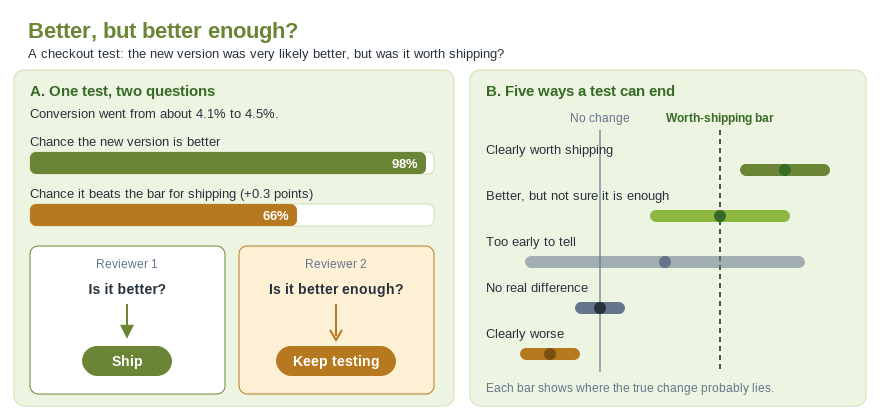 Figure 1. Left: the new page was very likely better, but only about two in three likely to clear the bar the team set for shipping. Right: the five ways a test can end, compared with that bar (illustrative ranges).
That kind of disagreement is ordinary in A/B testing. With AI agents it gets worse. A button colour does not remember anything, call other systems or ask a human for help. An agent does all three. The rest of this post covers six places where ordinary A/B tests go wrong on agents, and what to do instead.
Test the whole setup
Teams often call an experiment "model A versus model B". What they actually change is a whole setup: the prompt, the tools the agent may call, the documents it searches, what it remembers, when it hands over to a person, and even how much computing power it gets. Change any one of these and the agent behaves differently.
Hardware alone is enough to move results. Anthropic, the AI lab, ran the same model on the same programming tasks with tighter and looser computing limits, and the share of tasks it solved moved by about 6 percentage points. If the old and new versions ran with different limits, a test of "the model" is partly a test of the machines.
What to do: write down the full setup for each version, including limits and timeouts, and keep everything the same except the one thing you mean to test.
Groups that leak
An ordinary A/B test assumes the two groups cannot affect each other: showing one customer a new page does nothing to another customer. Agents break that assumption in three common ways:
- Shared memory. If both versions save and reuse the same notes from past tickets, the new version's notes help the old one, and the difference between them shrinks.
- Shared people. If both versions send hard cases to the same human review team, a version that escalates more slows down reviews for everyone.
- Dropped failures. If you only count requests that finished, a version that refuses or times out on hard cases looks better than it is.
This is not a small effect. Airbnb compared the two ways of running the same pricing test and found that, in a pricing test, splitting customer by customer made the change look at least 20% bigger than it really was, because both groups shopped in the same marketplace.
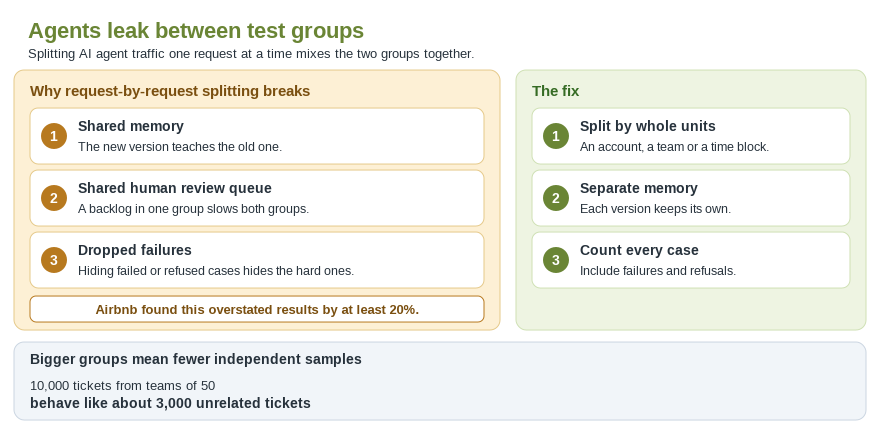 Figure 2. Splitting agent traffic request by request lets memory, reviewers and dropped failures mix the groups. Splitting by account, team or time block keeps them apart.
The fix is to split by something bigger than a single request: a whole account, a team, or a block of time where everyone gets the same version. Time blocks need care, because people behave differently on different days and memory can carry over from one block to the next. Give each version its own memory, and count every case that was put into the test, including the ones that failed.
Bigger groups have a cost. Tickets handled by the same team resemble each other, so they carry less new information. In one example, 10,000 tickets from teams of 50 gave about as much information as 3,000 unrelated tickets would have.
What to do: pick the unit of the split first, based on what the versions share, and plan the test size around the number of groups, not the number of requests.
Peeking and fishing
Most dashboards show a live result. It is tempting to check every day and stop as soon as the new version looks like a winner. The trouble is that random noise makes a version look like a winner now and then, even when it is no better. Every extra look is another chance to catch one of those moments.
We simulated tests where the two versions were identical, so any "winner" was luck. With one check at the planned end, about 5% of tests still named a winner, which is the error rate the test is designed to allow. Checking 40 times and stopping at the first good-looking result raised that to about 30%: roughly one test in three crowned a version that was no better. This habit is called peeking.
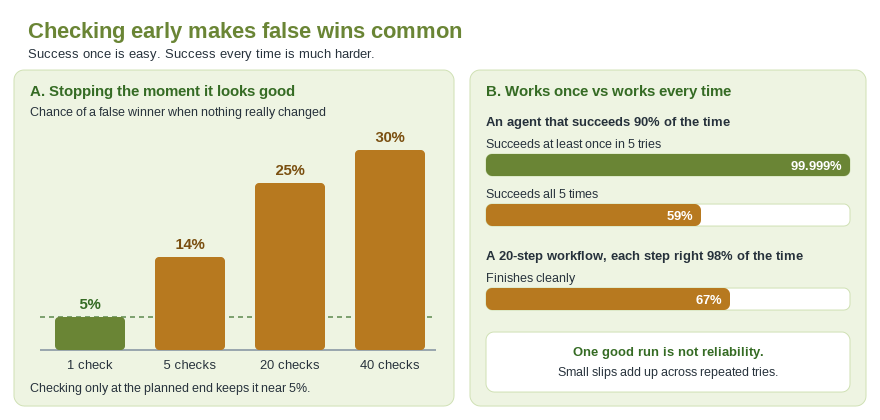 Figure 3. Left: the more often you check and stop early, the more often you crown a winner that is no better. Right: an agent that usually succeeds can still fail often when it must succeed every time.
Testing many things at once has the same effect. Try 20 prompt ideas that are all no better than the current one, and the chance that at least one looks like a winner by luck is about two in three. Agent teams try many prompts, measures and customer groups, so this adds up quickly. Pick one main measure before the test and treat everything else as a hint to test properly later.
Some improvements only show up in combination. In an illustrative example, a better prompt and an automatic checker each gave a small gain on their own, but together they lifted success from 70% to 89%. Plan the combinations you care about in advance, because each extra one is another chance for luck.
When the goal is to send more traffic to whatever is working, rather than to learn which version is better, adaptive methods (often called bandits) shift traffic toward the leader as results come in. They waste less traffic on weak versions, but the plain averages they produce are skewed, because the leader got more traffic at different times. If you want to measure the result later, record how likely each case was to get each version at the moment it was assigned.
What to do: decide the test length and the main measure before you start, and check the result once at the end, unless you use a method designed for early checks.
Once versus every time
An agent that gets a task right 90% of the time looks reliable. Give it five tries and keep the best answer, and it gets the task right at least once 99.999% of the time. But in production a customer usually needs it right every time. The chance it succeeds on all five tries is only about 59%.
Long workflows multiply the problem. If each of 20 steps works 98% of the time, the whole workflow finishes cleanly only about two times in three. These numbers assume each try is independent; real retries on the same task are often linked, but the lesson holds: a demo that shows one good run says little about how often it works.
Using an AI model to grade the answers adds a second layer of error. In one check of such a grader against 200 answers whose correct verdict was known, it let one in five broken answers through as passes. A version that writes longer, more confident answers can look better to a grader like this without being better. Where possible, check the actual result: was the database updated, was the refund issued, did the ticket stay closed. Benchmarks such as τ-bench score agents this way, by checking the final state of the system rather than the wording of the reply.
Studies of AI tools at work show the same gap between a good demo and steady work. Developers using GitHub Copilot finished a set task 56% faster. But when METR, an independent research group, studied experienced developers working on their own mature projects, they took 19% longer with AI tools allowed.
What to do: measure whether the agent succeeds every time on full tasks, and check real outcomes instead of trusting an AI grader alone.
The real cost
A cheaper model is not always cheaper. What matters is the cost of a finished task: the model and its tools, the human time spent reviewing, and the time spent fixing mistakes. Count the tasks that failed or were abandoned too, because they still cost money.
| Setup | Model and tools | Review and fixes | Cost per task |
|---|---|---|---|
| Current setup | $0.20 | $1.00 | $1.20 |
| Cheaper model | $0.08 | $1.60 | $1.68 |
| Model plus automatic checker | $0.32 | $0.50 | $0.82 |
In this illustrative example the cheaper model cut the model bill by more than half, but made more mistakes, so people spent more time reviewing and fixing its work. Total cost went up by 40%. Spending a little more on an automatic checker caught mistakes early and brought the total down by about a third.
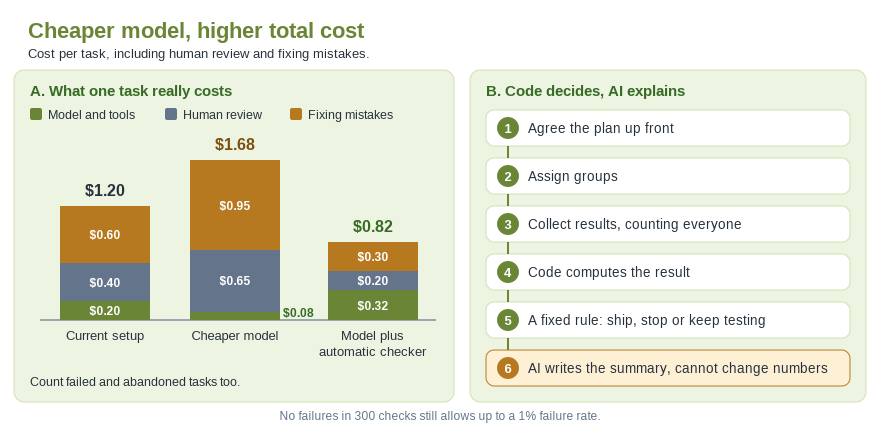 Figure 4. Left: cost per task split into model, review and fixing mistakes. Right: a test pipeline where code computes the result and the AI only writes the summary.
What to do: compare versions on the full cost of a finished task, not on the price per call.
Code decides
It is tempting to let an AI agent analyse the experiment too: pull the data, run the numbers and recommend whether to ship. The two analysts at the start of this post were AI agents doing exactly that, and it is risky. An agent might quietly drop the customers who never finished, change the success measure after seeing the data, or stop the test early because the trend looked good.
Keep the decision in plain code that nobody changes during the test:
- Agree the plan up front. Write down the main measure, the size of improvement worth shipping, the test length and how cases are split.
- Count everyone who was assigned. Start from the list of assigned customers or tasks, not from the list of results, so failures and drop-outs stay in the count.
- Let a fixed rule decide. Code computes the result and applies the agreed rule: ship, stop, or keep testing.
- Let the AI explain, not decide. An AI can turn the locked result into a readable summary, but it cannot change the numbers or the rule.
What to do: treat the AI as the writer of the report, never as the judge of the test.
Frequently asked questions
When can requests be split?
When the two versions share nothing that one could change for the other: no shared memory, no shared cache, no shared review team and no shared capacity limits. If they share any of these, split by account, team or time block instead.
Can replays replace live tests?
Not fully. Replaying past conversations shows how a new version handles the same start, but as soon as it asks a different question or calls a different tool, the recorded conversation no longer applies. Use replays to rule out weak versions quickly, then test the survivors live.
Does zero failures mean safe?
No. Seeing no failures in a test only limits how common failures can be. As a rule of thumb, with no failures in N checks you can only be 95% sure the true failure rate is below about 3 in N. So no failures in 300 checks still leaves room for a failure rate of up to 1%. For actions that must never go wrong, also block them with hard permissions, not just testing.